
The SharePoint Server end of support deadline arrived on July 14, 2026. SharePoint Server 2016 and SharePoint Server 2019 left extended support that day, along with the related Project Server versions. Any farm still running them is now unsupported production software. Microsoft has confirmed there is no paid Extended Security Update program for either version. That leaves three legitimate paths forward, each with its own trade-offs.
This guide covers what changed on July 14, why the risk profile shifted overnight, how to choose a destination, and a 90-day plan for teams still running on-premises SharePoint.

What happened on July 14, 2026
SharePoint Server 2016 and 2019 both reached the end of extended support. Microsoft no longer releases security patches, cumulative updates or fixes for either version. Microsoft support also can’t open break-fix cases against them. If a farm fails at 2:00 AM on a Saturday, the escalation path is now your partner or your own team.
InfoPath Forms Services was also removed from SharePoint Online after July 14, 2026. Any InfoPath forms that survived the move to the cloud need replacing, typically with Power Apps. Project Server 2016 and 2019 hit the same date, which also exposes hybrid Project Online setups that relied on the on-premises side.
Why SharePoint Server end of support is different this time
Microsoft offered Extended Security Updates for products such as Windows Server 2012 and SQL Server 2012. There is no ESU program for SharePoint Server 2016 or 2019, so there is no paid way to keep receiving patches. SharePoint Server Subscription Edition, by contrast, follows the Modern Lifecycle Policy and has no fixed retirement date, a first for the product family.

Compliance is the first place this shows up. Running unsupported software commonly produces findings in HIPAA, SOC 2, PCI DSS, ISO 27001 and GDPR audits. It also weakens your position with cyber insurers. As a result, the business case for waiting gets weaker every quarter.
The three migration paths
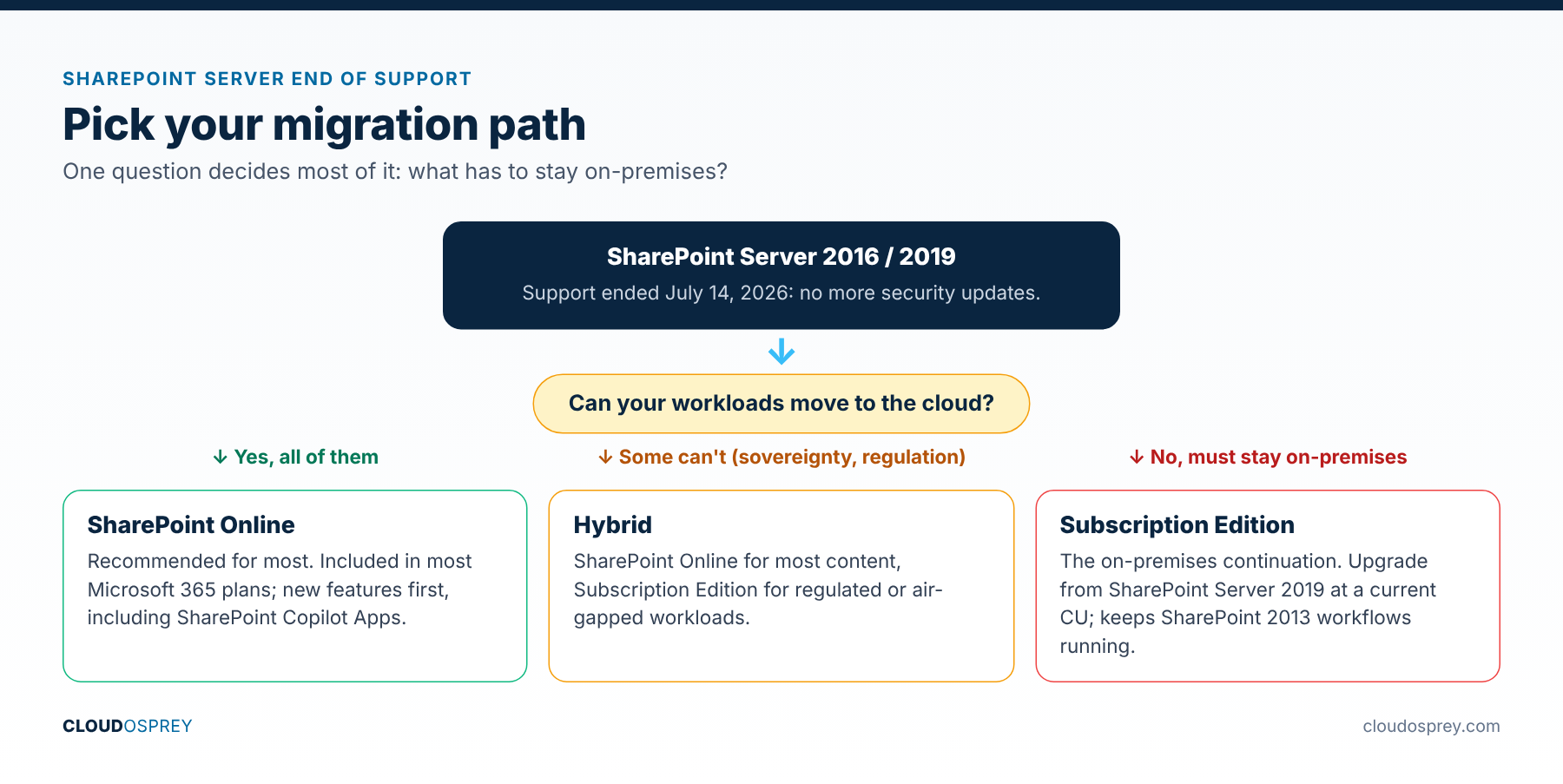

- SharePoint Online (SPO). The recommended path for most organizations. It is included in most Microsoft 365 plans and gets new features first, including SharePoint Copilot Apps.
- SharePoint Server Subscription Edition (SPSE). The on-premises continuation. It supports upgrades from SharePoint Server 2019 at a current cumulative update and keeps legacy dependencies such as SharePoint 2013 workflows working.
- Hybrid. A mix of SPO and SPSE for organizations with data sovereignty, regulatory or air-gapped workloads that can’t move fully to the cloud.
Microsoft positions SharePoint Online as the priority destination, and many new features may never reach SPSE. Still, SPSE matters for regulated industries, sovereign clouds and workloads that need modern authentication without a full cloud move.
Check your third-party tools
The impact goes beyond Microsoft. Migration, backup, workflow, DLP and eDiscovery vendors generally support only Microsoft-supported versions, so expect compatibility announcements from ISVs over the coming months. Put an add-on and connector inventory at the top of your readiness checklist, and confirm with each vendor that their product supports your target. Teams that skip this often finish the SharePoint move and only then discover a critical add-on can’t follow.
SharePoint Online or Subscription Edition?
- Choose SharePoint Online if you want native Microsoft 365 Copilot integration, SharePoint Copilot Apps and Microsoft 365 Archive.
- Choose Subscription Edition if you need data residency guarantees, run classified or sovereign workloads, or must keep SharePoint 2013 workflows or full-trust code running while you refactor.
- Choose hybrid if you have mixed workloads, a multi-year cloud transition, or regulated content that must stay on-premises for now.
An enterprise SharePoint migration typically takes six to eighteen months, depending on data volume and customization. Teams starting now are already behind, and the exposure grows every month.
Where Copilot fits
The end of support coincides with Microsoft repositioning SharePoint as the content backbone for AI. SharePoint Copilot Apps entered public preview in July 2026. They let migrated SharePoint Online sites host interactive Copilot components built with SPFx, a capability not expected in SPSE soon. Copilot Cowork, generally available since June 16, 2026, can run multi-step tasks against content that lives in SharePoint Online. Moving the content is what unlocks these features.
Your next 90 days

- Inventory every farm, database and customization, including SPFx solutions, full-trust code, workflows, InfoPath forms and third-party connectors.
- Classify content by risk and business value. Highly regulated data usually moves last; inactive content can be archived or retired.
- Map your ISV dependencies and confirm support for your target.
- Pick a destination per workload: SPO for collaboration and AI, SPSE for regulated or specialized workloads, hybrid for phased plans.
- Move to modern authentication and Entra ID. Retire NTLM and legacy authentication wherever possible before cutover.
- Check Copilot readiness. Confirm sensitivity labels, permissions and Restricted SharePoint Search before Copilot sees migrated content. Our SharePoint oversharing guide walks through it.
- Explain the risk to leadership in compliance, insurance and support terms, not only technical ones.
- Set a firm cutover date. Nine to twelve months is realistic for most enterprises.
Mistakes to avoid
Delaying, patching informally, or lifting and shifting without cleanup all create problems later. An in-place upgrade to SPSE without cleanup carries legacy permissions, orphaned sites and stale workflows into the new farm. Similarly, a “migrate and forget” move to SPO ignores the Copilot governance layer, which now matters as much as file paths.
Teams also underestimate identity work. Modern authentication, Conditional Access and sensitivity labels are what let Copilot behave safely in the new environment. So treat identity, DLP and labeling as migration workstreams in their own right.
Bottom line
The SharePoint Server end of support date has passed, so the work now shifts from planning to execution. Pick a destination per workload, publish a timeline, and start this quarter.
Last reviewed: October 2026
Sources
- Stefan Goßner: SharePoint End of Support, What Changed on July 15, 2026
- Microsoft Learn: SharePoint Server Subscription Edition 26H1
- Microsoft 365 Developer Blog: SPFx Roadmap Update, July 2026
- Microsoft 365 Blog: Copilot Cowork Generally Available
- Channel Insider: SharePoint On-Prem End of Life Migration Guide
Discover more from Cloud Osprey
Subscribe to get the latest posts sent to your email.
